
What retopology is and when you need it
September 23, 2026 · 5 min read
Generated and scanned meshes are dense and irregular. Retopology rebuilds them into clean, lighter geometry that engines, animators and artists can work with — here is when it is worth it and how to do it.
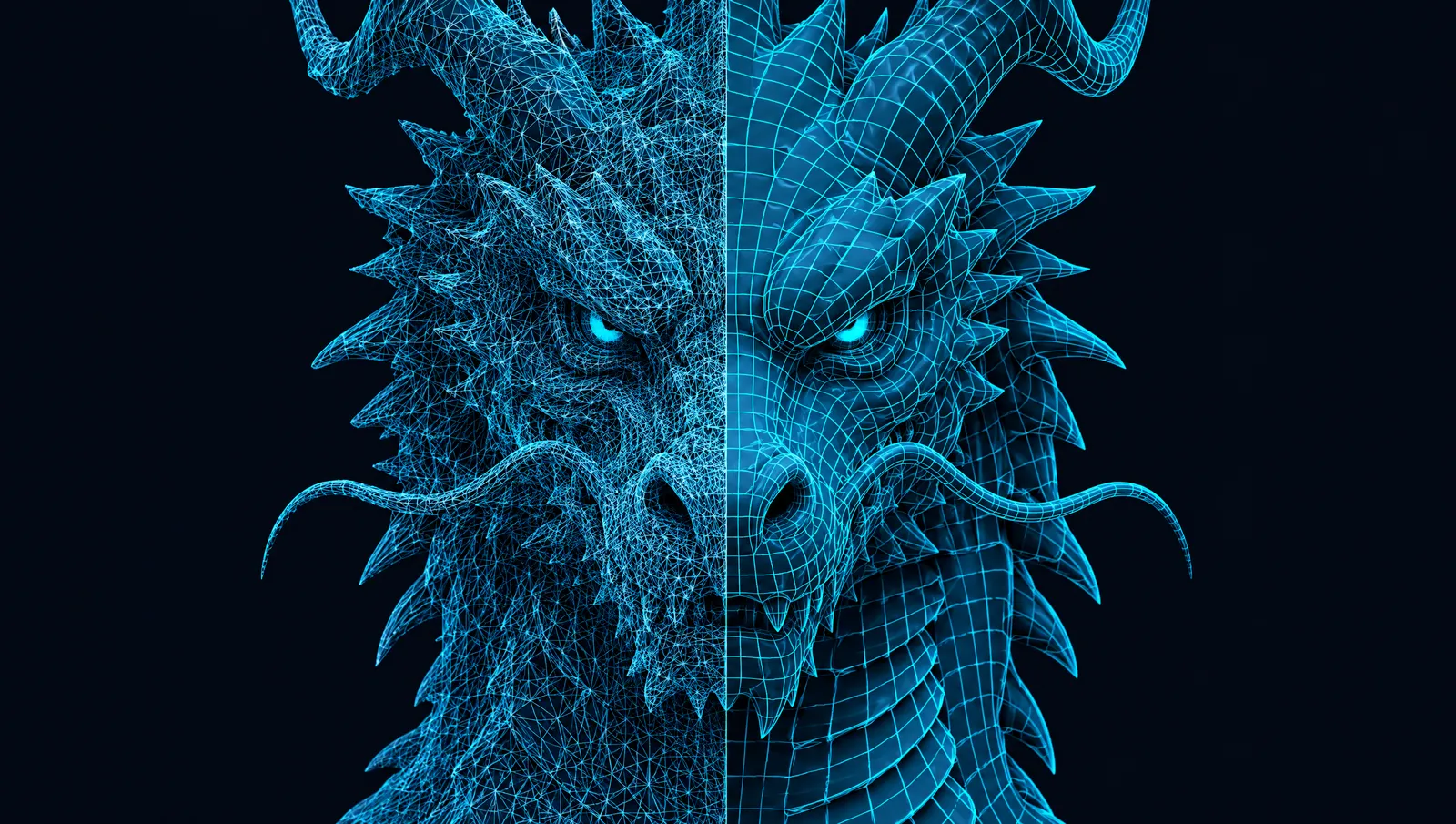
Generated and scanned meshes tend to be dense, irregular triangle soups. They look fine in a still render, but they are heavy to load, awkward to edit and deform badly when animated. Retopology rebuilds the surface with far fewer, better-organised polygons, and bakes the original's fine detail into a normal map so the result still looks detailed.
This guide explains what topology is, when retopology is worth doing, the main approaches, and how the MeshForge Retopology step works.
What "topology" means
Topology is the layout of a mesh: where its vertices are and how its faces connect them. Two meshes can have exactly the same shape and very different topology. One might be a million tiny triangles scattered at random; the other a few thousand quads that follow the form in clean loops.
Good topology has three qualities:
- Economy. Polygons are spent where the silhouette needs them, not spread evenly over flat areas.
- Edge flow. Edge loops follow the natural lines of the form — around the eyes and mouth of a face, around joints of a limb — so the surface deforms predictably.
- Regularity. Mostly quads of similar size, which subdivide cleanly and are easy to select and edit.
When you probably need it
- The model is going into a real-time engine and the raw count is above your budget.
- You plan to rig and animate it: clean loops at the joints bend much better.
- You want to hand-edit it in a modelling tool, UV-unwrap it or sculpt on top of it.
- You need levels of detail: a clean base mesh is easier to reduce further.
When you probably don't
- You only need a turntable video, a still render or a thumbnail.
- It is going to a 3D printer. Printers care that the mesh is closed and solid, not about edge flow.
- It will be viewed at a distance where the extra polygons never show and performance is fine.
The main approaches
| Approach | How it works | Good for | Trade-off |
|---|---|---|---|
| Decimation | Collapses edges to remove polygons while keeping the shape | Quick reduction for props and LODs | Triangles stay irregular; poor for animation |
| Voxel / remesh | Rebuilds the surface on a regular grid | Cleaning up broken or overlapping geometry | Even density everywhere, ignores edge flow |
| Automatic quad remeshing | Solves for a flow field and places quads along it | Fast, fairly clean quad meshes | Less control around faces and joints |
| Manual retopology | An artist draws new geometry over the old surface | Hero characters, faces | Slow and skilled work |
In Blender
Blender covers several of these. The Decimate modifier offers Collapse, Un-Subdivide and Planar modes for reduction. The Remesh modifier rebuilds geometry in Blocks, Smooth, Sharp or Voxel mode. Blender's retopology tools and snapping support drawing new geometry over a high-poly surface by hand.
Instant Meshes
Instant Meshes is a free, open-source field-aligned remesher from the research paper by Jakob, Tarini, Panozzo and Sorkine-Hornung. It produces quad-dominant meshes quickly, and its algorithm has been adopted in commercial software.
Baking: keeping the detail
Retopology on its own would throw detail away. The second half of the process is baking: comparing the new low-poly surface with the original high-poly one and storing the difference in a normal map. At render time the normal map makes light behave as if the fine detail were still there. This is why a 10,000-face retopologised model can look almost like its million-face source.
Baking works best when the low-poly surface closely follows the high-poly one. Very aggressive reductions leave gaps the normal map cannot cover, which shows up as warped details near the silhouette.
Retopology in MeshForge
Retopology is its own step after generation:
- Open the model and choose Retopology.
- Set a target face count between 500 and 100,000. The default is 10,000.
- Check the price, which is shown before you start.
- When it finishes, compare the result in the wireframe and normal map views.
A reasonable starting point is the lowest budget from your target platform — see our guide on polycount — then step up if details near the outline look soft.
If you know from the start that you want quads, the generation options also include quad topology (delivered as FBX) and low-poly models designed to be game-ready without a separate step.
A quick checklist
- Silhouette still reads correctly from every side?
- Joints have enough loops to bend (for animated models)?
- No visible seams or warping in the normal map?
- Face count inside your engine's budget?
Quads, triangles and n-gons
You will often hear that good topology is "all quads". The reasons are practical. Quads form clean edge loops — rings of faces you can select, slide and add to in one click — and they subdivide predictably, which matters when a model is smoothed for rendering. Triangles are fine for static game props: engines convert everything to triangles anyway. N-gons (faces with more than four sides) are best avoided in anything that will deform or subdivide, because renderers and tools split them unpredictably.
A reasonable rule of thumb:
| Destination | Topology that matters |
|---|---|
| Static prop in a game | Triangle count and a clean silhouette; quads optional |
| Animated character | Quads with loops around joints, eyes and mouth |
| Subdivision / film | All quads, even density, no n-gons |
| 3D printing | None — only a closed, solid surface |
How much to reduce
Start by asking how big the model will appear on screen. A prop that never fills more than a tenth of the screen can lose most of its polygons without anyone noticing, as long as the outline holds. Reduce in steps, compare the silhouette against the original each time, and stop when the outline starts to soften.
Sources & further reading
- Blender Manual: Retopology — tools for rebuilding topology by hand.
- Blender Manual: Remesh modifier and Decimate modifier.
- Instant Meshes on GitHub — open-source field-aligned remeshing.
- Unreal Engine: Nanite virtualized geometry — one engine approach to very dense meshes.